Turn Any Online Recipe Into an Instacart Grocery List
Grocery Genie is a recipe-to-grocery-list tool that turns recipes from your favorite websites into organized grocery lists you can shop through Instacart. Paste or open a recipe, let Grocery Genie extract the ingredients, review your grocery list, and send everything to Instacart when you are ready to order.
How Grocery Genie Works
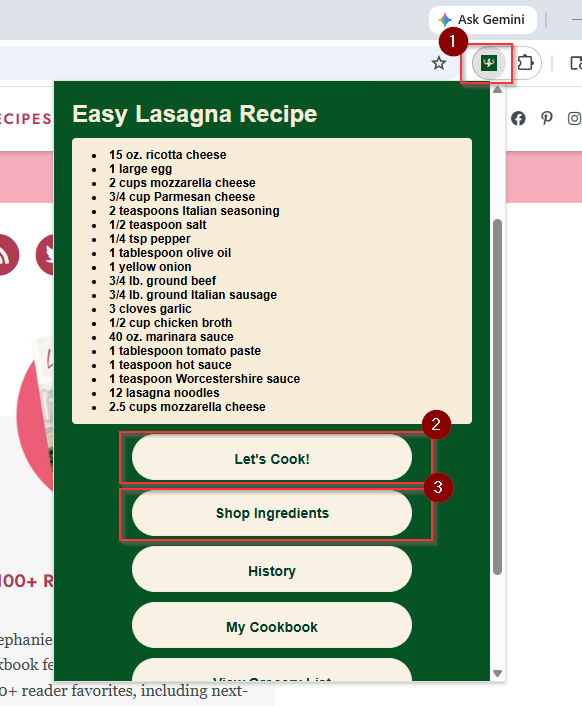
Open your favorite recipe website
Open the Grocery Genie Chrome extension to extract the recipe ingredients
Click “Let’s Cook!” to turn the recipe ingredients into an organized grocery list
Click “Shop Ingredients” to send your grocery list to Instacart and start shopping
Why Use Grocery Genie for Grocery Shopping?
Extracts clean recipe ingredients from any website
Helps organize your grocery list before checkout
Sends ingredients to Instacart so you can place an order
Saves recipes and directions to your cookbook
Frequently Asked Questions
Q: Can I use Grocery Genie with any recipe website?
A: Yes! Ingredients will be parsed cleanly from any recipe website on the internet.
Q: Does Grocery Genie cost anything to use?
A: Nope! Grocery Genie is completely free to use
Q: Do I need the Chrome extension?
A: No, but we do recommend it. You can paste a recipe URL into our home page to grocery shop without the extension. Without the extension you will need to adjust item quantities manually on Instacart
Q: Do you have cookbook functionality?
A: Yes! Every recipe that you pull ingredients from will automatically be saved into your personal cookbook. In the cookbook you can access the cooking directions for your recipe.